you’re probably already paying for a custom email address service
custom email address?
you know those really cool-looking email addresses that end in a custom domain? something like hello@coolcompany.com instead of coolcompany1234@gmail.com.
maybe you have seen one from a company, school, or suspiciously well-organized freelancer and thought setting it up required big money and big nerd knowledge. it does not. if you use an iphone, the answer may already be hiding inside icloud+. (android users, stay with me)
who cares?
well, hear me out, rude fella. a custom address will not magically make a bad email good, but it can make you look more intentional when emailing about a job, collaboration, invoice, or other adult type shi.
my custom email was actually one of the easiest things i have set up throughout my film/tech career. building hdpark.mov was the difficult part. making an address that uses the same domain was weirdly easy. (before you try sending me spam, no i don’t have an email address with hdpark.mov)
if you are a long-time iphone user, you have probably seen the increasingly threatening notification that your icloud storage is almost full. maybe you eventually went, “oh, $0.99 per month for 50 gb ain’t that bad.” fair. but that plan also includes a feature apple barely talks about: custom email domain.
“dan i’m fucking poor” – said the daily starbucks enjoyer from los angeles
in big america, the basic 50 gb icloud+ plan is currently $0.99 per month, or $11.88 per year.
wanna do some girl math?
a normal, non-premium .com domain through cloudflare is currently around $10–11 per year. add those together and the entire setup is roughly $22–23 per year, or less than $2 per month before tax. that’s basically free. girl math!
that is a pro looking email address for less than one roll of gaff tape a year, and unlike gaff tape nobody on set can “borrow” it forever. if your gaff tape is cheaper than 23 dollars you’re using terrible gaff tape btw.
if you already pay for icloud+, girl math says the email service is free and you are only paying for the domain. if you already own the domain too, big girl math says i just found you a feature you were already paying for.
if you want a fancy domain like .tv .movie .zip .mov you pay a little more for street cred but that’s up to you rich girl.
tutorial time!
you need an icloud+ subscription (again, you might already pay for this lol), two-factor authentication on your apple account, and a primary @icloud.com address (which you can change to your custom.com address later). then choose your adventure:
option 1: i do not own a domain (iphone users)
this is the easiest route because apple lets you buy one directly from icloud settings through cloudflare.
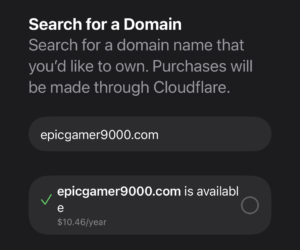
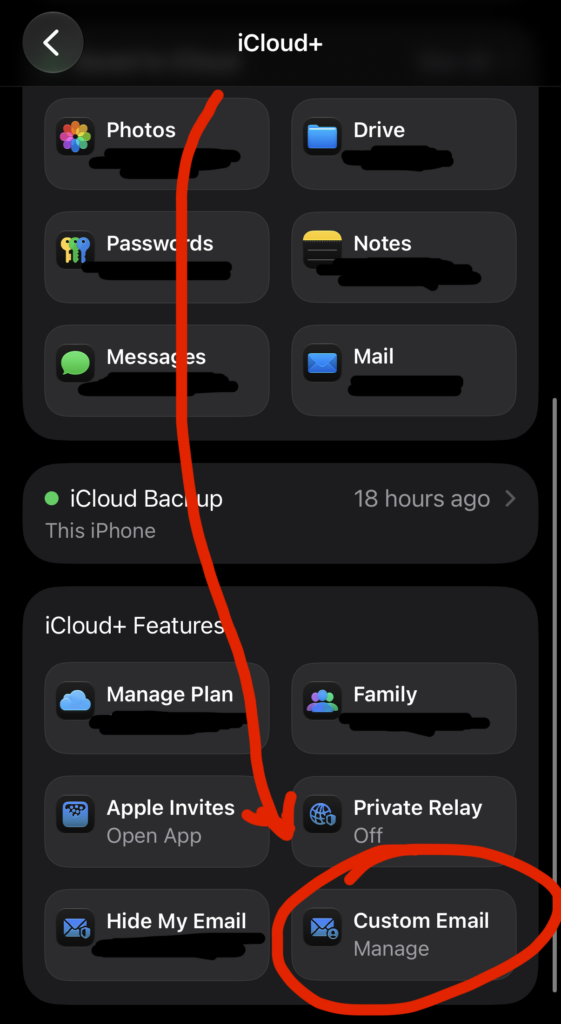
- on your iphone, go to settings > [your name] > icloud > mail.
- make sure use on this iphone is turned on.
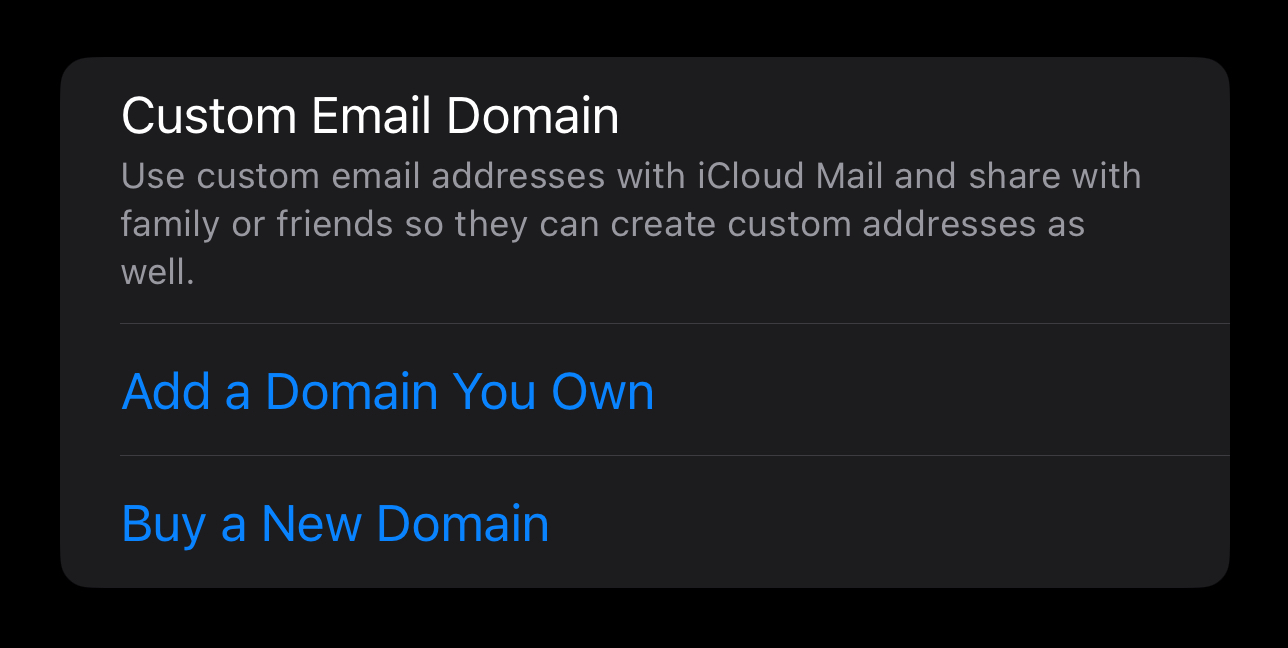
- tap custom email domain, then buy a domain.
- search for the domain you want and follow the cloudflare checkout.
- return to icloud and create your new email address.
icloud and cloudflare handle the email records automatically, so you skip the scary dns portion of our program. you can also start this from icloud.com/icloudplus by selecting custom email domain > buy a new domain.
smol warning: apple pay can be used for the first purchase, but it won’t renew automatically. add a credit card or paypal in cloudflare afterward, or remember to renew manually. losing the domain would be so tragic.
option 2: i already own a cloudflare domain (iphone users)
- go to settings > [your name] > icloud > mail > custom email domain.
- tap use a domain you own.
- choose whether it is only for you or will be shared with other people, then enter the domain.
- add any email addresses that already exist at the domain.
- follow the registrar setup that icloud shows you.
if apple offers a sign in to cloudflare or automatic setup button, use it. after you authorize the connection, the required email records can be added for you. congratulations: character development avoided.
if that button does not appear, icloud will show you the mx, txt, and cname records to copy into your domain’s dns settings. copy them exactly, save, then return to icloud and verify the domain. it looks much scarier than it is.
important: if you’re already using another email provider using the same domain, lmao good luck migrating idk how that works but it should be easy to change it to this if you want.
option 3: i already own a domain (not cloudflare)
this is my personal opinion but i highly recommend switching to cloudflare cuz other domain providers are kinda cringe with the renewal costs being different to the original price. cloudflare might have a scary looking dashboard compared to something like godaddy but it’s so easy to navigate to exactly what you need and you will not be surprised with epic annual cost increases outta nowhere, and cloudflare provides so good protection built into your domain usage for free.
if you’re still on the fence about this, i swear i’ll make it so worth it for you by posting more tutorials that use cloudflare features. (eg. wanna learn how i made this website for less than a starbucks coffee a month and YOU OWN everything?)
anyway if you own a domain outside of cloudflare already and don’t intend to change you should know how to apply your records already so frick you bro.
make your addresses and test them
icloud allows up to three active addresses per person* on each domain. for a personal portfolio, i would keep it simple:
- yourname@yourdomain.com for direct conversations
- hello@yourdomain.com for your website
- invoice@yourdomain.com if you enjoy getting paid
- (before making the last two, read the “privacy side quest” section)
choose your default “from” address, then test both directions. send a message from another account to the new address, reply from icloud mail, and confirm the reply actually comes from your custom address. do this before printing 500 business cards.
*: that’s right, per person. you can technically make a domain email address and share the same .com domain with homies if you want. imagine sharing a group chat name as a domain name with your friends like john@wallefanclub.com and kate@wallefanclub.com. yeah ok kinda cringe unless you own a small business with homies already.
the privacy side quest
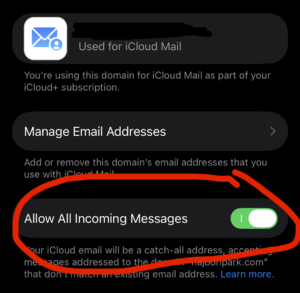
the domain owner can turn on a catch-all by going back to custom email domain, selecting the domain, and enabling allow all incoming messages.
now you can give every service its own address without creating each one first: netflix@yourdomain.com, adobe@yourdomain.com, or totally-legitimate-free-camera@yourdomain.com. they all arrive in your inbox.
if unrelated spam starts arriving through one address, you know where that address was originally used. that means it may have been leaked, shared, or scraped somewhere along the way, not that you have courtroom evidence the company personally sold it.
the catch: you can receive at these made-up addresses, but you can only send from the three active addresses you created in icloud.
android users, you may re-enter the room
you can use icloud mail in a browser or add the account to a mail app using imap. supported apps may let you authorize with your apple account; others need an app-specific password from account.apple.com. apple keeps its current mail-server settings here.
know the cons and limitations
- your mail now depends on icloud and your apple account.
- mail uses your icloud storage, and a completely full account cannot receive new messages.
- this is great for an individual or family, but it is not a full business suite with shared inboxes and administrators.
- you must keep renewing both icloud+ and the domain.
for something apple barely talks about, this may be one of the best features hiding inside that $0.99 subscription. custom email acquired. professionalism increased. you survived dns or cloudflare kindly survived it for you. woooooooooo!